|

 Android > resource - 문자열 리소스 <string>
안드로이드에서는 여러 리소스들을 /res/ 밑에서 관리한다.
문자열 리소스는 기본적으로 /res/values 밑에 strings.xml에서 관리된다.
필요한 문자열을 strings.xml에 등록하고, layout과 Activity에서 리소스를 사용해보자.
1. res(리소스)에 String 문자열 등록하기
res/values/strings.xml
sample1 : Hello~! Friends~! 라는 String을 리소스로 등록했다.
sample2 : Hello~! 는 기울기를 넣고, Android~!를 볼드 처리한 String을 리소스로 등록했다.
sample3 : 첫번째 인자(%1)은 문자형($s), 두번째 인자(%2)는 숫자형($d)로 매핑할 수 있는 String을 리소스로 등록했다.
(app_name, action_settings, hello_world는 최초 프로젝트 생성시 등록되어 있다.)
2. layout의 xml에서 String 리소스 불러오기
안드로이드의 화면은 /res/layout 밑에 xml 파일로 정의되어 있다.
프로젝트 생성시 최초 화면은 activity_main.xml 로 지정되어 있다.
activity_main.xml에 등록한 String 리소스를 불러와 화면에 출력해보자.
res/layout/activity_main.xml
- <TextView> 가 3개 등록되어있다.
- 첫 번째 <TextView>는 id가 textView1 이며, string 리소스중 name이 sample1의 문자열을 가져온다.(android:text="@string/sample1")
결과: textView1 : Hello~! Friends~!
- 두번째, 세번째 <TextView>도 마찬가지로 id는 textView2, textView3 이며, stirng 리소스중 name이 sample2, sampl3의 문자열을 가져온다.
결과: textView2 : <i>Hello~!</i><b>Android~!</b> , textView3 :Name : %1$s, Score : %2$d
실행화면을 보자!
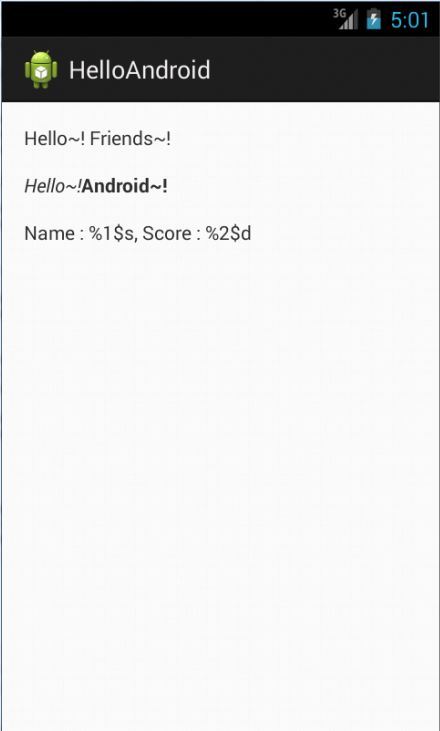
-strings.xml 에 등록된 문자열 리소스들을 출력한다. 와 등 HTML의 문법이 적용되지만,
%1$s, %2$d 는 Activity에서 Formatting으로 매핑을 해줘야 한다.
3. Activity.java에서 리소스 불러오기
MainActivity.java에서 리소스에 등록된 string 문자열을 불러와서 사용해보자.
- String 문자열은 getString() 으로 리소스에 등록된 string 문자열을 가져온다.
- sample1 문자열을 가져와서 TextView1 에 셋팅했다.
- getText()의 경우 리소스에 등록된 문자열의 태그 속성까지 가져온다. 그리고 반환값은 String이 아닌 CharSequence 이다.
- getText()를 사용하여 sample2의 <i></i> <b></b> 속성까지 가져와서 TextView2에 셋팅했다.
- getString()으로 가져온 sample3 에 String.format() 을 사용하여 인자값을 매핑해준다. (%1$s, %2$d)
- formatting한 결과를 resultText에 대입한 후 TextView3에 셋팅한다.
- 레이아웃에서 그대로 불러온 것과 달리 (%1$s, %2$d) 에 데이터가 매핑되어 출력된다.
프로그램을 실행해보자.

- getText()로 불러온 sample2가 HTML 태그까지 적용되어 실행된다.
- sample3에 데이터가 매핑되어 출력된다.
문자열 리소스는 기본적으로 /res/values 밑에 strings.xml에서 관리된다.
필요한 문자열을 strings.xml에 등록하고, layout과 Activity에서 리소스를 사용해보자.
1. res(리소스)에 String 문자열 등록하기
res/values/strings.xml
	<?xml version="1.0" encoding="utf-8"?>
	<resources>

		<string name="app_name">HelloAndroid</string>
		<string name="action_settings">Settings</string>
		<string name="hello_world">Hello world!</string>

		<string name="sample1">Hello~! Friends~!</string>
		<string name="sample2"><i>Hello~!</i><b>Android~!</b></string>
		<string name="sample3">Name : %1$s, Score : %2$d</string>

	</resources>
sample1 : Hello~! Friends~! 라는 String을 리소스로 등록했다.
sample2 : Hello~! 는 기울기를 넣고, Android~!를 볼드 처리한 String을 리소스로 등록했다.
sample3 : 첫번째 인자(%1)은 문자형($s), 두번째 인자(%2)는 숫자형($d)로 매핑할 수 있는 String을 리소스로 등록했다.
(app_name, action_settings, hello_world는 최초 프로젝트 생성시 등록되어 있다.)
2. layout의 xml에서 String 리소스 불러오기
안드로이드의 화면은 /res/layout 밑에 xml 파일로 정의되어 있다.
프로젝트 생성시 최초 화면은 activity_main.xml 로 지정되어 있다.
activity_main.xml에 등록한 String 리소스를 불러와 화면에 출력해보자.
res/layout/activity_main.xml
	<RelativeLayout xmlns:android="http://schemas.android.com/apk/res/android"
		xmlns:tools="http://schemas.android.com/tools"
		android:layout_width="match_parent"
		android:layout_height="match_parent"
		android:paddingBottom="@dimen/activity_vertical_margin"
		android:paddingLeft="@dimen/activity_horizontal_margin"
		android:paddingRight="@dimen/activity_horizontal_margin"
		android:paddingTop="@dimen/activity_vertical_margin"
		tools:context=".MainActivity" >

		<TextView
			android:id="@+id/textView1"
			android:layout_width="wrap_content"
			android:layout_height="wrap_content"
			android:text="@string/sample1" />

		<TextView
			android:id="@+id/textView2"
			android:layout_width="wrap_content"
			android:layout_height="wrap_content"
			android:layout_alignLeft="@+id/textView1"
			android:layout_below="@+id/textView1"
			android:layout_marginTop="15dp"
			android:text="@string/sample2" />

		<TextView
			android:id="@+id/textView3"
			android:layout_width="wrap_content"
			android:layout_height="wrap_content"
			android:layout_alignLeft="@+id/textView2"
			android:layout_below="@+id/textView2"
			android:layout_marginTop="15dp"
			android:text="@string/sample3" />

	</RelativeLayout>
- <TextView> 가 3개 등록되어있다.
- 첫 번째 <TextView>는 id가 textView1 이며, string 리소스중 name이 sample1의 문자열을 가져온다.(android:text="@string/sample1")
결과: textView1 : Hello~! Friends~!
- 두번째, 세번째 <TextView>도 마찬가지로 id는 textView2, textView3 이며, stirng 리소스중 name이 sample2, sampl3의 문자열을 가져온다.
결과: textView2 : <i>Hello~!</i><b>Android~!</b> , textView3 :Name : %1$s, Score : %2$d
실행화면을 보자!
-strings.xml 에 등록된 문자열 리소스들을 출력한다. 와 등 HTML의 문법이 적용되지만,
%1$s, %2$d 는 Activity에서 Formatting으로 매핑을 해줘야 한다.
3. Activity.java에서 리소스 불러오기
MainActivity.java에서 리소스에 등록된 string 문자열을 불러와서 사용해보자.
		// string 리소스중 name이 sample1의 문자열을 getString()으로 가져온다.
		// 리소스에서 id가 textView1인 TextView를 가져와 sample1 을 textView1 에 적용한다.

		String sample1 = getString(R.string.sample1);
		TextView textView1 = (TextView)findViewById(R.id.textView1);
		textView1.setText(sample1);

		// string 리소스중 name이 sample2의 문자열을 getText()로 가져온다.
		// 리소스에서 id가 textView2인 TextView를 가져와 sample2을 textView2 에 적용한다.

		CharSequence sample2 = getText(R.string.sample2);
		TextView textView2 = (TextView)findViewById(R.id.textView2);
		textView2.setText(sample2);

		// string 리소스중 name이 sample3의 문자열을 getString()으로 가져온다.
		// name 이라는 String에 html형식으로 인코딩한 "Hyeon" 문자열을 저장한다.
		// String.format 을 사용하여 sample3 에 name과 90을 인자로 대입한 결과를 resultText에 대입한다.

		String sample3 = getString(R.string.sample3);
		String name = TextUtils.htmlEncode("Hyeon");
		String resultText = String.format(sample3, name, 90);

		// 리소스에서 id가 textView3인 TextView를 가져와 resultText를 textView3 에 적용한다.

		TextView textView3 = (TextView)findViewById(R.id.textView3);
		textView3.setText(resultText);
- String 문자열은 getString() 으로 리소스에 등록된 string 문자열을 가져온다.
- sample1 문자열을 가져와서 TextView1 에 셋팅했다.
- getText()의 경우 리소스에 등록된 문자열의 태그 속성까지 가져온다. 그리고 반환값은 String이 아닌 CharSequence 이다.
- getText()를 사용하여 sample2의 <i></i> <b></b> 속성까지 가져와서 TextView2에 셋팅했다.
- getString()으로 가져온 sample3 에 String.format() 을 사용하여 인자값을 매핑해준다. (%1$s, %2$d)
- formatting한 결과를 resultText에 대입한 후 TextView3에 셋팅한다.
- 레이아웃에서 그대로 불러온 것과 달리 (%1$s, %2$d) 에 데이터가 매핑되어 출력된다.
프로그램을 실행해보자.
- getText()로 불러온 sample2가 HTML 태그까지 적용되어 실행된다.
- sample3에 데이터가 매핑되어 출력된다.
|
|
||||
|
이메일 문의 : cak0280@nate.com Copyright 2000 By ENTERSOFT.KR All Rights Reserved. |