|

 Android > ActionBar - 스타일 및 테마 변경하기
지난번에 Action Bar를 추가하는 것까지 공부 했는데 이번에는 Action Bar Style 변경 및 테마 변경 방법을 알아보겠습니다.
기본적으로 셋팅되는 Action Bar의 색상은 아래와 같이 세팅됩니다. Action Bar는 Dark 그리고 텍스트가 노출되는 화면은 Light 입니다.
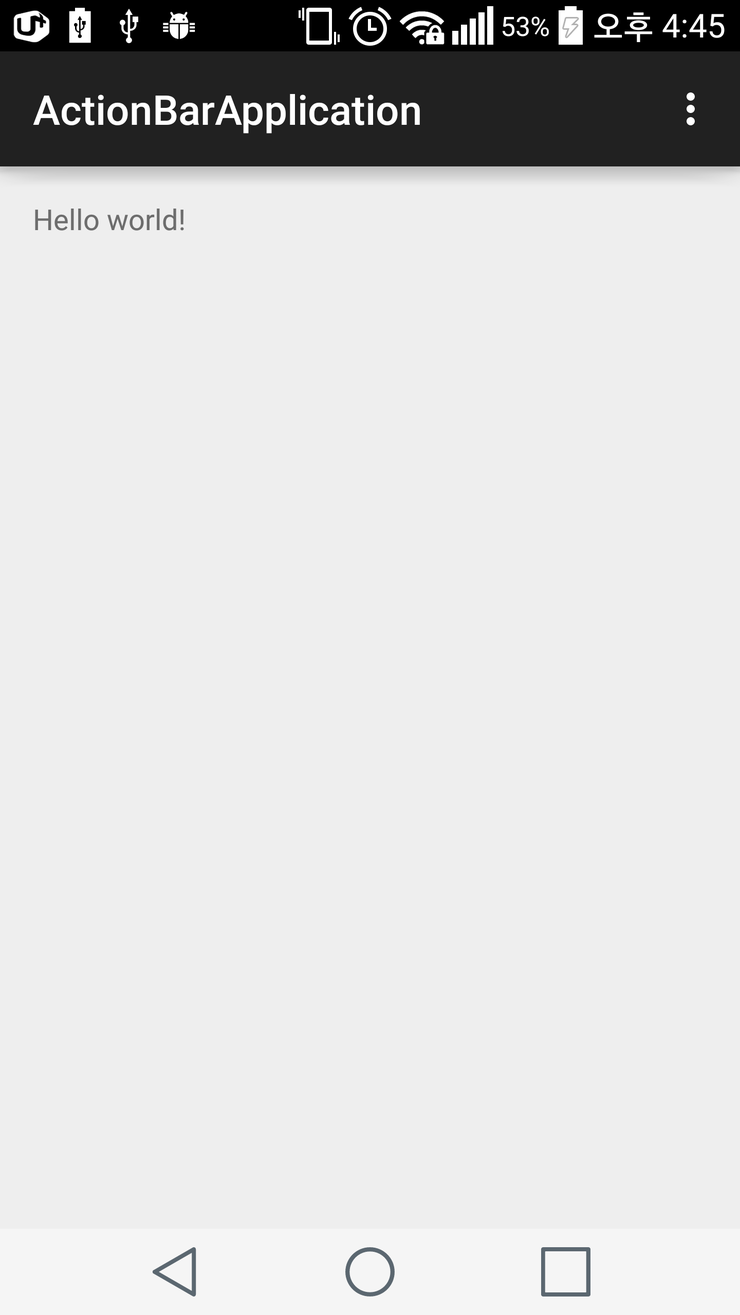
그리고 manifests 폴더에서 AndroidManifest.xml 파일을 오픈하면 />
그리고 manifests 폴더에서 AndroidManifest.xml 파일을 오픈하면 style/AppTheme 를 android:theme 로 정하고 있는데 style.xml 파일을 열어 보면
해당 속성이 설정되어 있음을 확인 할 수 있다.
manifests/AndroidManifest.xml
res 폴더에서 styles.xml 파일을 오픈하면 아래와 같이 정의 되어 있다.
res/value/styles.xml
App Theme 속성에 대한 값으로 Theme.AppCompat.Light.DarkActionBar 가 정의 되어 있는 것을 확인 할 수 있다.
Theme.AppCompat : 전체 Theme 를 Dark 로 설정
Theme.AppCompat.Light : 전체 Theme 를 Light 로 설정
Theme.AppCompat.Light.DarkActionBar : Action Bar 는 Dark 로 View 는 Light 로 설정
Theme.AppCompat.Light.DarkActionBar 를 위와 같은 값으로 변경하여 실행하여 보면 아래와 같이 변경된 Theme 로 적용되어 앱이 실행 된다.
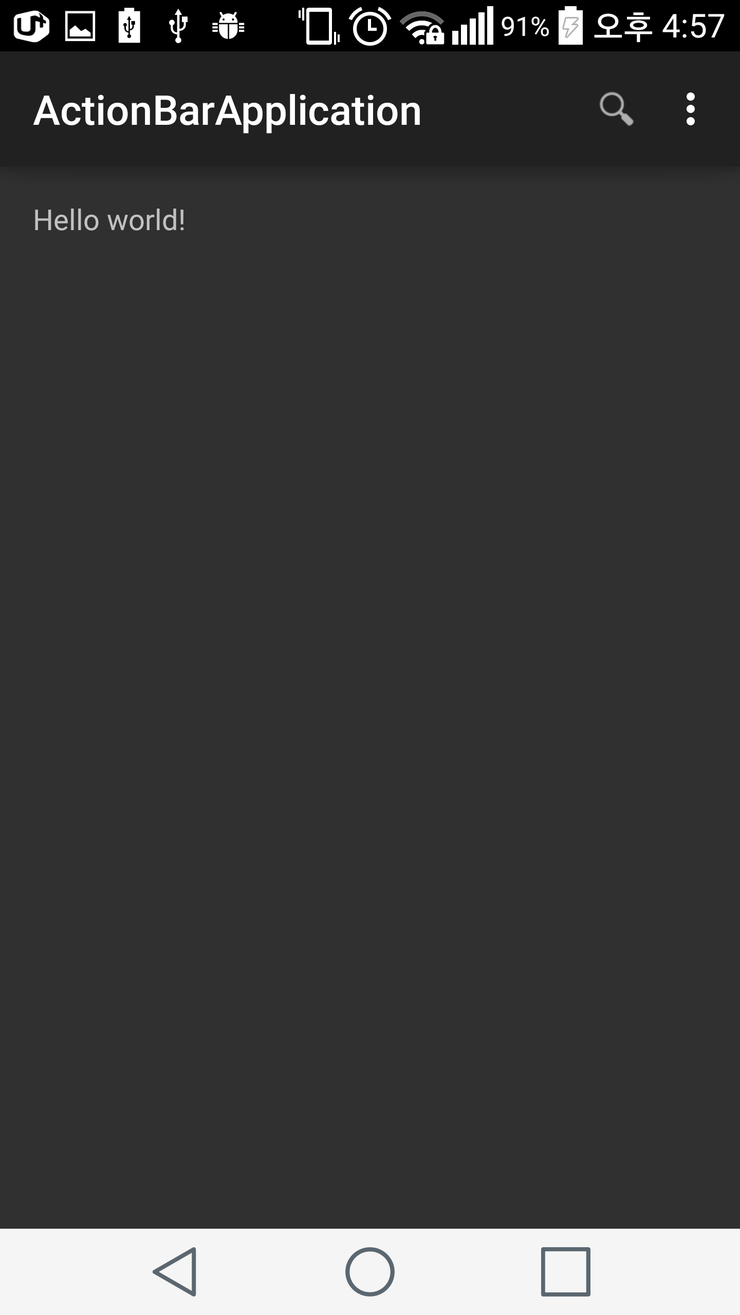
Theme.AppCompat 적용시 화면
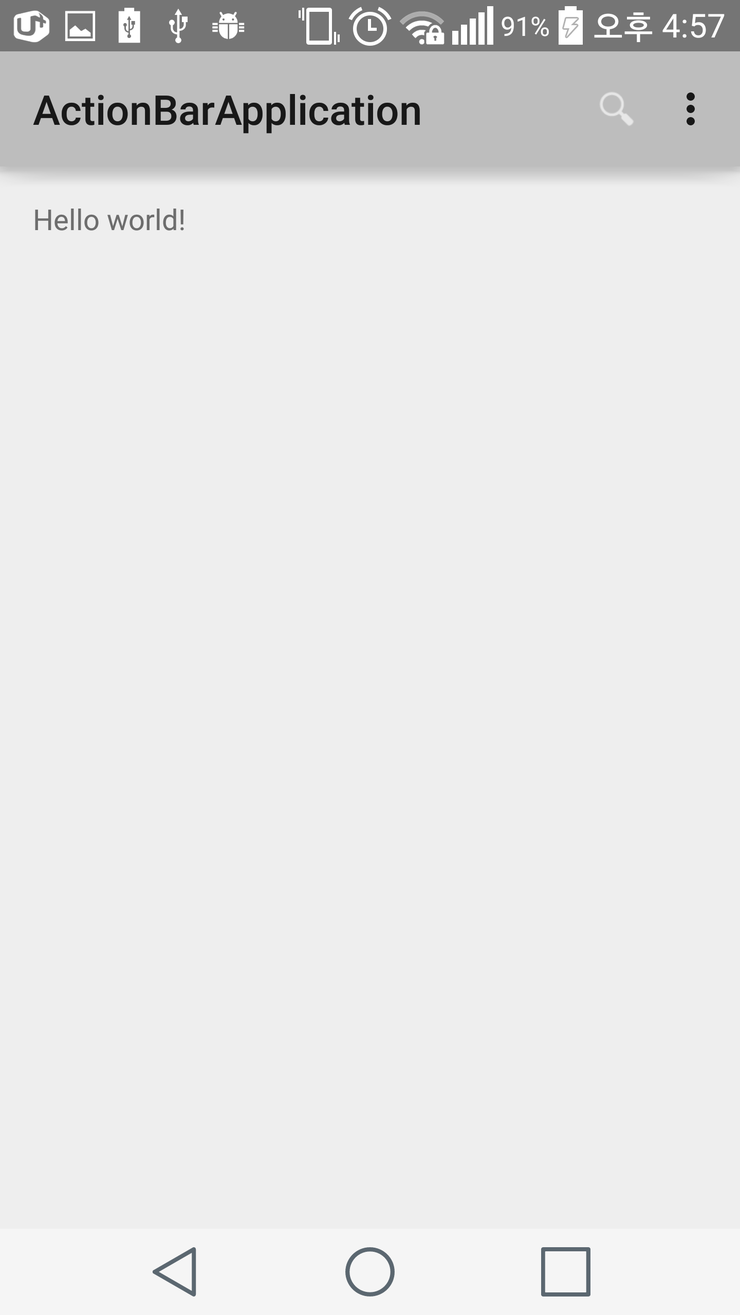
그리고 manifests 폴더의 AndroidManifest.xml 파일을 오픈하고 아래와 같이 수정한다.
manifests/AndroidManifest.xml
위와 같이 속성을 변경 후 실행하면 Dark Theme 가 적용된 앱이 실행 되는 것을 확인 할 수 있습니다.
이외에 Action Bar 를 커스터마이징 하여 적용할 수도 있습니다.
res/values 디렉토리에 themes.xml 파일을 새로 생성 하고 아래 코드를 입력 합니다.
res/values/themes.xml
기본적으로 셋팅되는 Action Bar의 색상은 아래와 같이 세팅됩니다. Action Bar는 Dark 그리고 텍스트가 노출되는 화면은 Light 입니다.
그리고 manifests 폴더에서 AndroidManifest.xml 파일을 오픈하면 />
그리고 manifests 폴더에서 AndroidManifest.xml 파일을 오픈하면 style/AppTheme 를 android:theme 로 정하고 있는데 style.xml 파일을 열어 보면
해당 속성이 설정되어 있음을 확인 할 수 있다.
manifests/AndroidManifest.xml
	<application
        android:allowBackup="true"
        android:icon="@mipmap/ic_launcher"
        android:label="@string/app_name"
        android:theme="@style/AppTheme" >
res 폴더에서 styles.xml 파일을 오픈하면 아래와 같이 정의 되어 있다.
res/value/styles.xml
   <!-- Base application theme. -->
    <style name="AppTheme" parent="Theme.AppCompat.Light.DarkActionBar">
        <!-- Customize your theme here. -->
    </style>
App Theme 속성에 대한 값으로 Theme.AppCompat.Light.DarkActionBar 가 정의 되어 있는 것을 확인 할 수 있다.
Theme.AppCompat : 전체 Theme 를 Dark 로 설정
Theme.AppCompat.Light : 전체 Theme 를 Light 로 설정
Theme.AppCompat.Light.DarkActionBar : Action Bar 는 Dark 로 View 는 Light 로 설정
Theme.AppCompat.Light.DarkActionBar 를 위와 같은 값으로 변경하여 실행하여 보면 아래와 같이 변경된 Theme 로 적용되어 앱이 실행 된다.
Theme.AppCompat 적용시 화면
그리고 manifests 폴더의 AndroidManifest.xml 파일을 오픈하고 아래와 같이 수정한다.
manifests/AndroidManifest.xml
   <application
        android:allowBackup="true"
        android:icon="@mipmap/ic_launcher"
        android:label="@string/app_name"
        android:theme="@style/AppTheme" -> android:theme="@android:style/Theme.Holo" >
	</div>
위와 같이 속성을 변경 후 실행하면 Dark Theme 가 적용된 앱이 실행 되는 것을 확인 할 수 있습니다.
이외에 Action Bar 를 커스터마이징 하여 적용할 수도 있습니다.
res/values 디렉토리에 themes.xml 파일을 새로 생성 하고 아래 코드를 입력 합니다.
res/values/themes.xml
<?xml version="1.0" encoding="utf-8"?>
<resources>
<!-- the theme applied to the application or activity -->
<style name="CustomActionBarTheme"
parent="@android:style/Theme.Holo.Light.DarkActionBar">
<item name="android:actionBarStyle">@style/MyActionBar</item>
</style>
<!-- ActionBar />
그리고 manifests 폴더의 AndroidManifest.xml 파일을 오픈하고 아래와 같이 수정한다.
manifests/AndroidManifest.xml
<application
android:allowBackup="true"
android:icon="@mipmap/ic_launcher"
android:label="@string/app_name"
android:theme="@style/AppTheme" -> android:theme="@android:style/Theme.Holo" >
</div>
위와 같이 속성을 변경 후 실행하면 Dark Theme 가 적용된 앱이 실행 되는 것을 확인 할 수 있습니다.
이외에 Action Bar 를 커스터마이징 하여 적용할 수도 있습니다.
res/values 디렉토리에 themes.xml 파일을 새로 생성 하고 아래 코드를 입력 합니다.
res/values/themes.xml
<?xml version="1.0" encoding="utf-8"?>
<resources>
<!-- the theme applied to the application or activity -->
<style name="CustomActionBarTheme"
parent="@android:style/Theme.Holo.Light.DarkActionBar">
<item name="android:actionBarStyle">@style/MyActionBar</item>
</style>
<!-- ActionBar styles -->
<style name="MyActionBar"
parent="@android:style/Widget.Holo.Light.ActionBar.Solid.Inverse">
<item name="android:background">#FF0000</item>
</style>
</resources>
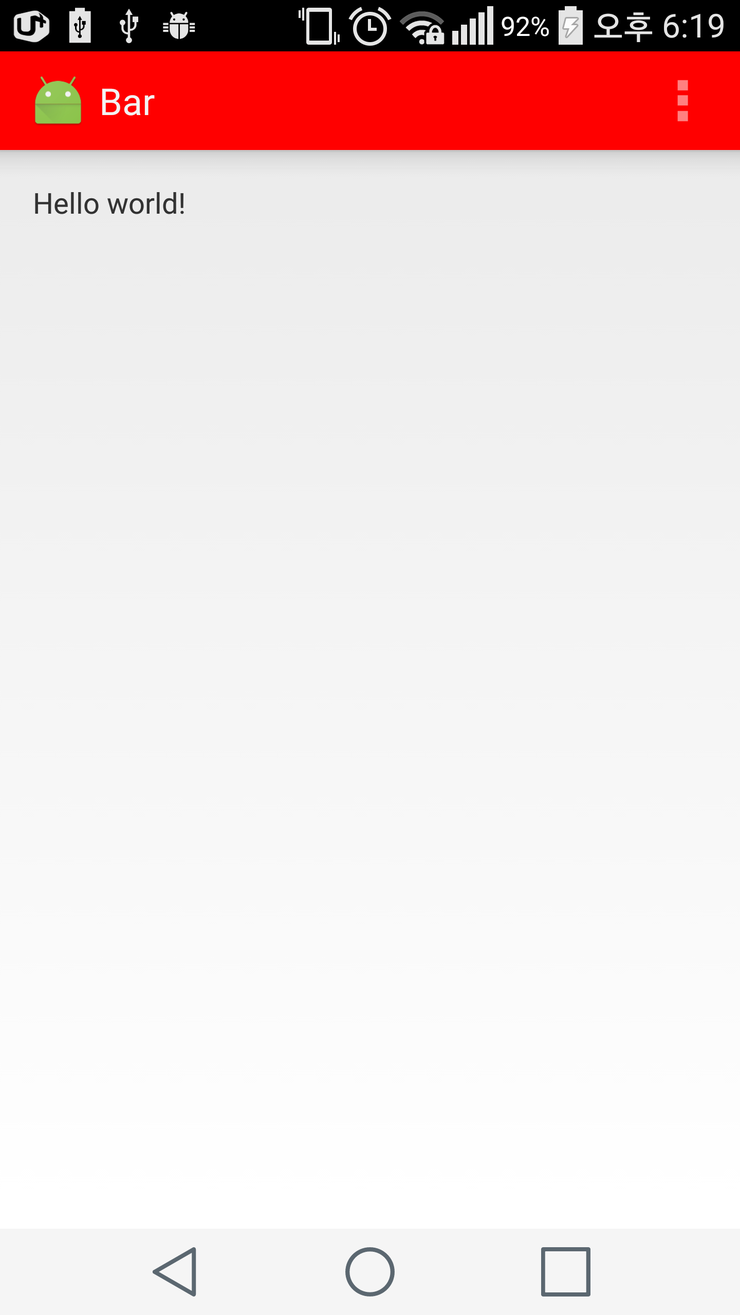
위의 코드를 보면 CustomActionBarTheme 를 생성하고 있는데 기본 Theme 를 정의하고 actionBarStyle 속성을 추가 하여 MyActionBar 의
속성을 참조 하는 것을 볼 수 있다. MyActionBar 에서는 background 의 색상을 변경 한다.
AndroidManifest.xml 파일을 오픈하여 아래와 같이 Theme 를 변경 합니다.
manifests/AndroidManifest.xml
<application
android:allowBackup="true"
android:icon="@mipmap/ic_launcher"
android:label="@string/app_name"
android:theme="@style/CustomActionBarTheme>
앱을 실행 하면 아래와 같이 Action Bar 의 Background 색상이 변경된 것을 확인 할 수 있다.
Action Bar 의 Text 색상을 변경할 수도 있다. res/values/themes.xml 파일에 아래와 같이 굵은 코드 부분을 추가 합니다.
res/values/themes.xml
<style name="MyActionBar"
parent="@android:style/Widget.Holo.Light.ActionBar">
<item name="android:background">#FF0000</item>
<item name="android:titleTextStyle">@style/MyActionBarTitleText</item>
</style>
<style name="MyActionBarTitleText"
parent="@android:style/TextAppearance.Holo.Widget.ActionBar.Title">
<item name="android:textColor">@color/actionbar_text</item>
</style>
추가된 코드는 MyActionBarTitleText 속성이 추가 되었고 해당 속성에는 ActionBar 의 textColor 를 @color/actionbar_text 를 값으로 하고 있습니다.
이제 res/values 디렉토리에 color.xml 이라는 파일을 생성 합니다.
res/values/color.xml
<?xml version="1.0" encoding="utf-8"?>
<resources>
<color name="actionbar_text">#FF1493</color>
</resources>
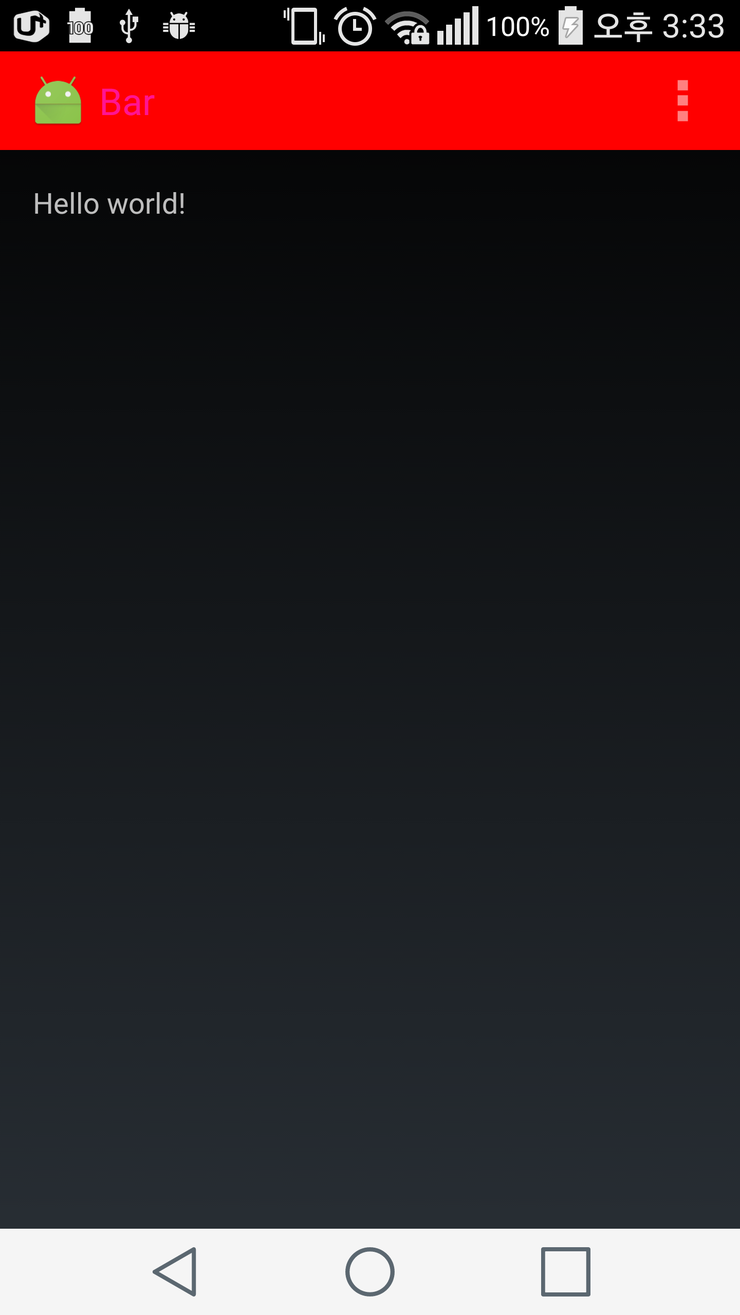
아래 소스는 themes.xml 에서 사용될수 있는 예제들을 넣은 소스 입니다.
여러가지의 />
아래 소스는 themes.xml 에서 사용될수 있는 예제들을 넣은 소스 입니다.
여러가지의 style을 변경할 수 있으니 참고하시기 바랍니다.
res/values/themes.xml
<resources xmlns:android="http://schemas.android.com/apk/res/android">
<style name="CustomActionBarTheme"
parent="@style/Theme.AppCompat">
<item name="android:actionBarStyle">@style/MyActionBar</item>
<item name="android:actionBarTabTextStyle">@style/MyActionBarTabText</item>
<item name="android:actionMenuTextColor">@color/actionbar_text</item>
<!-- Support library compatibility -->
<item name="actionBarStyle">@style/MyActionBar</item>
<item name="actionBarTabTextStyle">@style/MyActionBarTabText</item>
<item name="actionMenuTextColor">@color/actionbar_text</item>
</style>
<!-- ActionBar styles -->
<style name="MyActionBar"
parent="@style/Widget.AppCompat.ActionBar">
<item name="android:titleTextStyle">@style/MyActionBarTitleText</item>
<!-- Support library compatibility -->
<item name="titleTextStyle">@style/MyActionBarTitleText</item>
</style>
<!-- ActionBar title text -->
<style name="MyActionBarTitleText"
parent="@style/TextAppearance.AppCompat.Widget.ActionBar.Title">
<item name="android:textColor">@color/actionbar_text</item>
<!-- The textColor property is backward compatible with the Support Library -->
</style>
<!-- ActionBar tabs text -->
<style name="MyActionBarTabText"
parent="@style/Widget.AppCompat.ActionBar.TabText">
<item name="android:textColor">@color/actionbar_text</item>
<item name="android:background">@drawable/popup_background</item>
<!-- The textColor property is backward compatible with the Support Library -->
</style>
</resources>
위 themes.xml 파일에서 중요한 점은 ActionBar의 Tab 부분도 스타일링 할 수 있습니다. actionBarTabTextStyle 속성이 추가 되었고 style 도 추가되었습니다.
Tab 메뉴의 텍스트 색상이나, 백그라운드 이미지를 추가할 수 있게 되어 있습니다.
나중에 필요할 때 참고해서 개발해 보시기 바랍니다.
|
|
||||
|
이메일 문의 : cak0280@nate.com Copyright 2000 By ENTERSOFT.KR All Rights Reserved. |