|

 Android > HttpClient - HttpPost() 를 이용한 로그인 구현 (Cookie,세션 유지 포함)
오늘은 HttpPost() 메서드를 이용한 로그인 후 세션 유지 방법을 알아보도록 하겠습니다.
AndroidManifest.xml 에서 permission 을 아래처럼 추가해 줘야 겠지요?
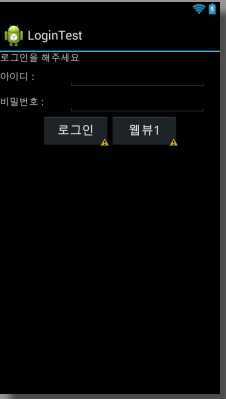
위의 이미지 처럼 로그인 디자인을 하기 위해 main.xml 파일을 디자인해 줘야 합니다.
layout/main.xml
위에서 사용할 string 변수도 선언되어야 겠죠.
values/string.xml
웹뷰 버튼을 눌렀을때 서버 페이지에 접속할 webView를 띄울 액티비티도 하나 추가합니다.
layout/webview.xml
이제 java 소스파일을 보도록 하겠습니다.
LoginTestActivity.java
SessionControl.java
WebViewTest.java
3개의 파일이 필요합니다.
src/LoginTestActivity.java
src/SessionControl.java
src/WebViewTest.java
서버쪽 프로그램은 로그인페이지, 세션을 확인할 수 있는 페이지를 만들어서 테스트 해 보시기 바랍니다.
프로젝트 전체소스를 첨부합니다.
 LoginTest.zip
AndroidManifest.xml 에서 permission 을 아래처럼 추가해 줘야 겠지요?
		<uses-permission android:name="android.permission.ACCESS_NETWORK_STATE"/>
		<uses-permission android:name="android.permission.ACCESS_WIFI_STATE"/>
		<uses-permission android:name="android.permission.WRITE_EXTERNAL_STORAGE"/>
		<uses-permission android:name="android.permission.INTERNET"/>
위의 이미지 처럼 로그인 디자인을 하기 위해 main.xml 파일을 디자인해 줘야 합니다.
layout/main.xml
	<?xml version="1.0" encoding="utf-8"?>
	<LinearLayout xmlns:android="http://schemas.android.com/apk/res/android"
	    android:layout_width="fill_parent"
	    android:layout_height="fill_parent"
	    android:orientation="vertical" >

	    <TextView
		android:id="@+id/text_msg"
		android:layout_width="fill_parent"
		android:layout_height="wrap_content"
		android:text="@string/login_msg" />

	    <LinearLayout
		android:orientation="horizontal"
		android:layout_width="fill_parent"
		android:layout_height="wrap_content"
		>
		<TextView
		    android:text="@string/login_id"
		    android:layout_width="100dip"
		    android:layout_height="wrap_content"
		    />
		    <EditText
			android:id="@+id/edit_id"
			android:inputType="text"
			android:layout_width="200dip"
			android:layout_height="wrap_content"
			/>
	    </LinearLayout>

	    <LinearLayout
		android:orientation="horizontal"
		android:layout_width="fill_parent"
		android:layout_height="wrap_content"
		>
		<TextView
		    android:text="@string/login_pw"
		    android:layout_width="100dip"
		    android:layout_height="wrap_content"
		    />
		    <EditText
			android:id="@+id/edit_pw"
			android:inputType="textPassword"
			android:layout_width="200dip"
			android:layout_height="wrap_content"
			/>
	    </LinearLayout>

	    <LinearLayout
		android:orientation="horizontal"
		android:layout_width="fill_parent"
		android:layout_height="wrap_content"
		android:gravity="center_horizontal"
		>
			<Button
			    android:id="@+id/btn_login"
			    android:layout_width="100dip"
			    android:layout_height="wrap_content"
			    android:text="@string/login_btn"
			    />
			<Button
			    android:id="@+id/btn_web"
			    android:layout_width="100dip"
			    android:layout_height="wrap_content"
			    android:text="@string/web_btn"
			    />

	    </LinearLayout>

	</LinearLayout>
위에서 사용할 string 변수도 선언되어야 겠죠.
values/string.xml
	<string name="app_name">LoginTest</string>
	<string name="login_msg">로그인을 해주세요</string>
	<string name="login_id">아이디 : </string>
	<string name="login_pw">비밀번호 : </string>
	<string name="login_btn">로그인</string>
	<string name="web_btn">웹뷰1</string>
	<string name="web_btn1">웹뷰2</string>
웹뷰 버튼을 눌렀을때 서버 페이지에 접속할 webView를 띄울 액티비티도 하나 추가합니다.
layout/webview.xml
	<?xml version="1.0" encoding="utf-8"?>
	<LinearLayout xmlns:android="http://schemas.android.com/apk/res/android"
	    android:layout_width="fill_parent"
	    android:layout_height="fill_parent"
	>
		<WebView
			android:id="@+id/webview_test"
			android:layout_width="fill_parent"
			android:layout_height="fill_parent"
		></WebView>
	</LinearLayout>
이제 java 소스파일을 보도록 하겠습니다.
LoginTestActivity.java
SessionControl.java
WebViewTest.java
3개의 파일이 필요합니다.
src/LoginTestActivity.java
	public class LoginTestActivity extends Activity {
		/** Called when the activity is first created. */

		EditText et_id;
		EditText et_pw;
		TextView tv_msg;

		private static String id = "";
		private static String pw = "";
		private static String msgString = null;
		private static boolean isConnected = false;

		@Override
		public void onCreate(Bundle savedInstanceState) {
			StrictMode.enableDefaults();

			super.onCreate(savedInstanceState);
			setContentView(R.layout.main);

			et_id = (EditText) findViewById(R.id.edit_id);
			et_pw = (EditText) findViewById(R.id.edit_pw);

			tv_msg = (TextView) findViewById(R.id.text_msg);

			Button btn_web = (Button) findViewById(R.id.btn_web);

			btn_web.setOnClickListener(new View.OnClickListener() {
				public void onClick(View v) {
					Intent intent = new Intent(LoginTestActivity.this, WebViewTest.class);
					startActivity(intent);
				}
			});

			final Button btn_login = (Button) findViewById(R.id.btn_login);
			btn_login.setOnClickListener(new View.OnClickListener() {
				public void onClick(View v) {
					id = et_id.getText().toString();
					pw = et_pw.getText().toString();
					sendPostRequest(id,pw);
				}
			});
		}

		private void sendPostRequest(String user_id,   String user_pwd) {

			class SendPostReqAsyncTask extends AsyncTask {
				@Override
				protected String doInBackground(String... params) {
					String user_id = params[0];
					String user_pwd = params[1];

					Log.v("TAG","백그라운드 작업   user_id=" + user_id + " user_pwd=" + user_pwd);

					//HttpClient httpClient = new DefaultHttpClient();
					HttpClient httpclient = SessionControl.getHttpclient();	//변경

					HttpPost httpPost = new HttpPost("http://ankyu.entersoft.kr/logintest.asp"); // 여러분의 주소로 변경할 것

					BasicNameValuePair username = new BasicNameValuePair("user_id", user_id); 	// 서버의 프로그램에 따라 달라질수 있음
					BasicNameValuePair password = new BasicNameValuePair("user_pwd", user_pwd);	// 포스트로 보내는 변수

					List nameValuePairList = new ArrayList();
					nameValuePairList.add(username);
					nameValuePairList.add(password);

					try {
						UrlEncodedFormEntity urlEncodedFormEntity = new UrlEncodedFormEntity(nameValuePairList,"UTF-8");
						httpPost.setEntity(urlEncodedFormEntity);

						try {
							HttpResponse httpResponse = httpclient.execute(httpPost);
							InputStream inputStream = httpResponse.getEntity().getContent();
							InputStreamReader inputStreamReader = new InputStreamReader(inputStream);
							BufferedReader bufferedReader = new BufferedReader(inputStreamReader);
							StringBuilder stringBuilder = new StringBuilder();
							String bufferedStrChunk = null;

							while((bufferedStrChunk = bufferedReader.readLine()) != null){
								stringBuilder.append(bufferedStrChunk);
							}


							// 로그인 성공시 쿠키에 저장하자
							SessionControl.cookies = SessionControl.httpclient.getCookieStore().getCookies();//추가

							//읽어온 쿠키값을 한번 출력 하여 보자.
							Cookie cookie;

							if (!SessionControl.cookies.isEmpty())
							{
								for (int i = 0; i < SessionControl.cookies.size(); i++)
								{
									cookie = SessionControl.cookies.get(i);
									Log.v("TAG","===>>>"+ cookie.toString() );
								}
							}

							Log.v("TAG",stringBuilder.toString());	///// 이곳에서   서버에서  보내온 메시지를 확인해 볼 수 있다..
							  //성공/실패 여부에 따라 적절히  대응하자.
							return stringBuilder.toString();
						} catch (ClientProtocolException cpe) {
							Log.v("TAG","First Exception caz of HttpResponese :" + cpe);
							cpe.printStackTrace();
						} catch (IOException ioe) {
							Log.v("TAG","Second Exception caz of HttpResponse :" + ioe);
							ioe.printStackTrace();
						}
					} catch (UnsupportedEncodingException uee) {
						Log.v("TAG","An Exception given because of UrlEncodedFormEntity argument :" + uee);
						uee.printStackTrace();
					}

					return null;
				}

				protected void onPostExecute(String result) {
					super.onPostExecute(result);
				}
			}

			//////////////////////////////////
			// 이곳에서 로그인을 위한 웹문서를 비동기 백그라운드로 요청한다.
			SendPostReqAsyncTask sendTask = new SendPostReqAsyncTask();
			sendTask.execute(user_id, user_pwd);     // 비동기 방식 백그라운드로 받아 오기.....
			///////////////////////////////////
		}


	}
src/SessionControl.java
	public class SessionControl {
		static public DefaultHttpClient httpclient = null;
		static public List cookies;

		public static HttpClient getHttpclient() {
			if( httpclient == null){
				SessionControl.setHttpclient(new DefaultHttpClient());
			}

		   return httpclient;
		}

		public static void setHttpclient(DefaultHttpClient httpclient) {
			SessionControl.httpclient = httpclient;
		 }
	}
src/WebViewTest.java
	public class WebViewTest extends Activity {
		String myUrlAddress ="http://ankyu.entersoft.kr/login_test1.asp";
		@Override
		public void onCreate(Bundle savedInstanceState) {
			super.onCreate(savedInstanceState);
			setContentView(R.layout.webview);

			WebView wv = (WebView) findViewById(R.id.webview_test);

			/////////////////   추가된 부분  /////////////

			Cookie sessionCookie =null;

			try {
				if(!SessionControl.cookies.isEmpty())
				{
					sessionCookie=SessionControl.cookies.get(0);

					CookieSyncManager.createInstance(this);
					CookieManager cookieManager = CookieManager.getInstance();

					if (sessionCookie != null)
					{
						cookieManager.removeSessionCookie();
						String cookieString = sessionCookie.getName() + "=" + sessionCookie.getValue() + "; domain=" + sessionCookie.getDomain();
						cookieManager.setCookie(myUrlAddress, cookieString);
						CookieSyncManager.getInstance().sync();
					}
				}
			}catch(Exception e){
				e.printStackTrace();
			 }finally
			 {
			 }


			/////////////////

			wv.loadUrl(myUrlAddress);
			wv.setWebChromeClient(new WebChromeClient());
			wv.getSettings().setJavaScriptEnabled(true);
			wv.setInitialScale(1);
			wv.getSettings().setLoadWithOverviewMode(true);
			wv.getSettings().setUseWideViewPort(true);
			wv.setScrollBarStyle(WebView.SCROLLBARS_OUTSIDE_OVERLAY);
			wv.setScrollbarFadingEnabled(false);
			wv.setWebViewClient(new InfoWebViewClient());


		}


		public void onResume() {
			super.onResume();
			CookieSyncManager.getInstance().startSync();
		}

		public void onPause() {
			super.onPause();

			if (CookieSyncManager.getInstance() != null) {
				CookieSyncManager.getInstance().stopSync();
			}
		}


		private class InfoWebViewClient extends WebViewClient {
			@Override
			public boolean shouldOverrideUrlLoading(WebView view, String url) {
				//if (Uri.parse(url).getHost().equals("www.example.com")) {
					// This is my web site, so do not override; let my WebView load the page
					//return false;
				//}
				view.loadUrl(url);
				// Otherwise, the link is not for a page on my site, so launch another Activity that handles URLs
				//Intent intent = new Intent(Intent.ACTION_VIEW, Uri.parse(url));
				//startActivity(intent);
				return true;
			}

			//WebView가 로딩이 끝나면 시작
			public void onPageFinished(WebView view, String url){
    			CookieSyncManager.getInstance().sync();
    		}
		}
	}
서버쪽 프로그램은 로그인페이지, 세션을 확인할 수 있는 페이지를 만들어서 테스트 해 보시기 바랍니다.
프로젝트 전체소스를 첨부합니다.
LoginTest.zip
|
||||||||||||
|
이메일 문의 : cak0280@nate.com Copyright 2000 By ENTERSOFT.KR All Rights Reserved. |