|

 Javascript & JQuery & CSS > ajax(), get(), post() - Ajax 사용법
1. ajax()
Jquery 에서 Ajax 사용방법 입니다.
문법을 간단히 살펴 보도록 하겠습니다.
초간단 샘플 예제를 준비했다.
두말 필요 없이 파일 만들어서 실행시켜서 결과 보면 됨.

3. post()
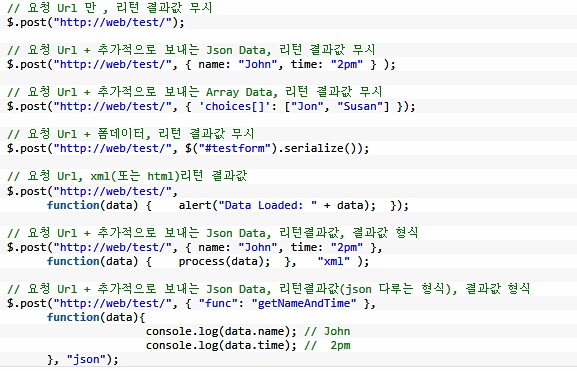
Jquery 에서 Ajax 사용방법 입니다.
		var url_val = "/test/t01.asp?bbb=테스트";

		$.ajax( {
			type: "POST",
			url: url_val,
			success : Whensuccess,
			error : WhenError
		});

		function Whensuccess(xml)
		{
			alert(xml);
			$("#aaa").append(xml);
		}

		function WhenError()
		{
			alert("Error");
		}
문법을 간단히 살펴 보도록 하겠습니다.
	$.ajax({
		type : "POST"	//"POST", "GET"
		, async : true	 //true, false
		, url : "Inquiry.jsp" //Request URL
		, dataType : "html" //전송받을 데이터의 타입 ("xml", "html", "script", "json"등 지정 가능)- 미지정시 자동 판단
		, timeout : 30000 //제한시간 지정
		, cache : false  //true, false
		, data : $("#inputForm").serialize() //서버에 보낼 파라메터

			//form에 serialize() 실행시 a=b&c=d 형태로 생성되며 한글은 UTF-8 방식으로 인코딩
			//"a=b&c=d" 문자열로 직접 입력 가능
			//{a:b, c:d} json 형식 입력 가능

		, contentType: "application/x-www-form-urlencoded; charset=UTF-8"
		, error : function(request, status, error) {
			//통신 에러 발생시 처리
			alert("code : " + request.status + "\r\nmessage : " + request.reponseText);

			if (request.status === 0) {
				msg = 'Not connect.\n Verify Network.';
			} else if (request.status == 404) {
				msg = 'Requested page not found. [404]';
			} else if (request.status == 500) {
				msg = 'Internal Server Error [500].';
			} else if (error === 'parsererror') {
				msg = 'Requested JSON parse failed.';
			} else if (error === 'timeout') {
				msg = 'Time out error.';
			} else if (error === 'abort') {
				msg = 'Ajax request aborted.';
			} else {
				msg = 'Uncaught Error.\n' + request.responseText;
			}
			alert(msg);

		}

		, success : function(response, status, request) {
			//통신 성공시 처리
			$('#resultDIV').append(response);
		}

		, beforeSend: function() {
			//통신을 시작할때 처리
			$('#ajax_indicator').show().fadeIn('fast');
		}

		, complete: function() {
			//통신이 완료된 후 처리
			$('#ajax_indicator').fadeOut();
		}
	});
2. get() 초간단 샘플 예제를 준비했다.
두말 필요 없이 파일 만들어서 실행시켜서 결과 보면 됨.
	---------------------------------------------------------
	get.asp

	$("button").click(function(){
		$.get("test.asp", function(data, status){
			alert("Data 값은 : " + data + "\n" + "Status 값은 : " + status);
		});
	});
	---------------------------------------------------------
	test.asp
	---------------------------------------------------------
	<%@ CODEPAGE=65001%>
	<%session.CodePage = "65001" %>
	<%response.charset = "utf-8"%>

	response.write "test.asp 의 내용 입니다."
3. post()
	---------------------------------------------------------
	get.asp

	$("button").click(function(){
		$.post("test.asp",
			{
			name:"davidseo",
			city:"gimpo"
			}, function(data, status){
			alert("Data 값은 : " + data + "\n" + "Status 값은 : " + status);
		});
	});

	---------------------------------------------------------
	test.asp
	---------------------------------------------------------
	<%@ CODEPAGE=65001%>
	<%session.CodePage = "65001" %>
	<%response.charset = "utf-8"%>

	response.write request("name") & ": 이름 입니다."
|
||||||||||||
|
이메일 문의 : cak0280@nate.com Copyright 2000 By ENTERSOFT.KR All Rights Reserved. |