|

 Python 프로그래밍 > PyQt5 - QtCore - QTimer (타이머)
PyQt5 에서 타이머 기능에 대해서 알아볼려고 합니다.
아래는 예제 소스 입니다.
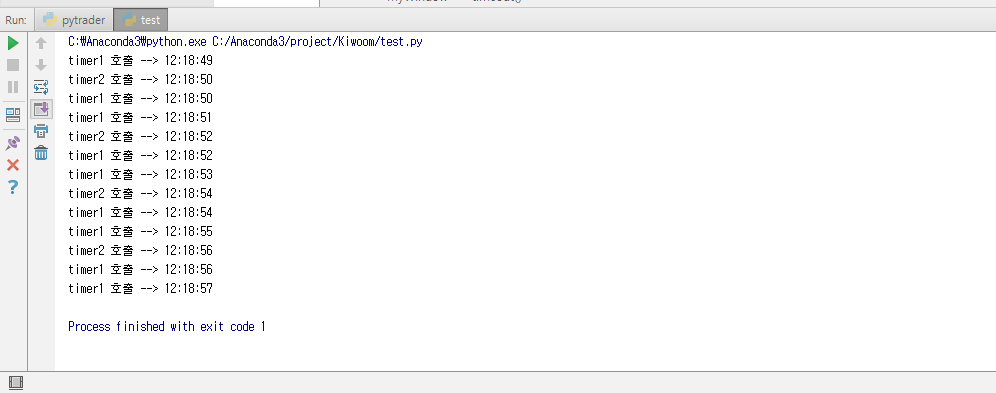
time1, time2 가 1초,2초 단위로 timeout 메서드를 호출하여, 현재 시간을 출력해 줍니다.
아래는 예제 소스 입니다.
import sys
from PyQt5.QtWidgets import QApplication, QMainWindow
from PyQt5.QtCore import QTimer, QTime

class MyWindow(QMainWindow):
    def __init__(self):
        super().__init__()

        # 메인 타이머
        self.timer1 = QTimer(self) #타이머 객체 생성
        self.timer1.start(1000*1)  #1초마다 타이머 실행, 시작
        self.timer1.timeout.connect(self.timeout) #슬롯 timeout() 객체 호출

        self.timer2 = QTimer(self)
        self.timer2.start(1000*2)
        self.timer2.timeout.connect(self.timeout)


    def timeout(self):
        #타임아웃 이벤트가 발생하면 호출되는 메서드
        # 어떤 타이머에 의해서 호출되었는지 확인
        sender = self.sender()

        currentTime = QTime.currentTime().toString("hh:mm:ss")

        if id(sender) == id(self.timer1):
            print("timer1 호출 -->",currentTime)

        if id(sender) ==id(self.timer2):
            print("timer2 호출 -->",currentTime)


if __name__ == "__main__":
    app = QApplication(sys.argv)
    myWindow = MyWindow()
    sys.exit(app.exec_())
아래 이미지는 실행한 화면 모습니다.time1, time2 가 1초,2초 단위로 timeout 메서드를 호출하여, 현재 시간을 출력해 줍니다.
|
|
||||
|
이메일 문의 : cak0280@nate.com Copyright 2000 By ENTERSOFT.KR All Rights Reserved. |